
Walkie Talkie - All Talk App
Picslo Corp.Social
4.51.07K Reviews
- Version
- 5.6.2
- Installs
- 10.00M
- Age Rating
- Teen
Screenshots
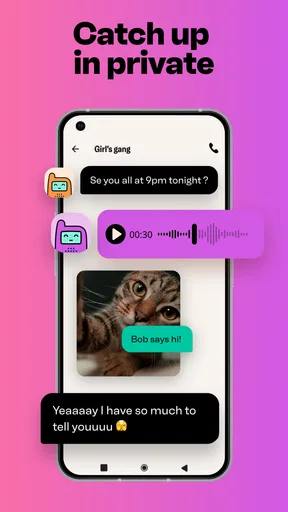
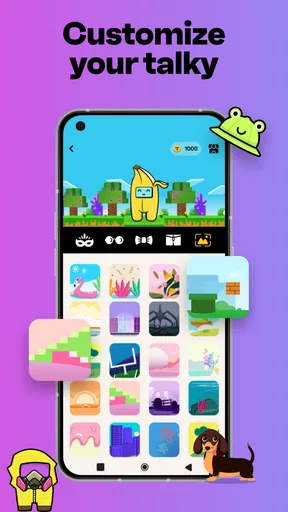

Our Review of Walkie Talkie - All Talk App
 Analysis by Appyee
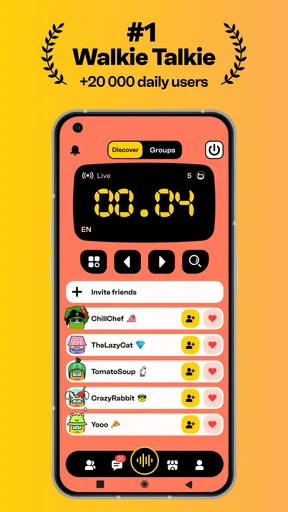
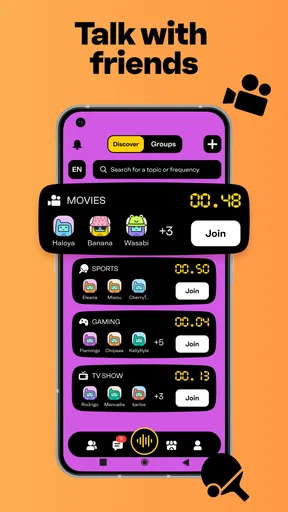
I approached Walkie Talkie - All Talk App as the kind of social app you open when a normal group chat feels too formal. Its idea is simple: join open voice frequencies, listen to conversations, and speak when you have something worth adding. That makes it feel closer to a digital walkie-talkie than to a typical feed, messaging inbox, or one-to-one call.
My first impression was that the appeal depends less on polished presentation and more on timing. When the right discussion is active, the app can turn a spare few minutes into a surprisingly lively exchange about movies, games, or everyday life. When the channels are quiet, crowded, or full of conversations that do not interest me, the experience becomes much less compelling. This is a social app built around live participation, so the quality of the moment matters more than a permanent stream of content.
It is free to install, carries a Teen content rating, and comes from Picslo Corp. The app has reached more than ten million installs and holds an average rating of 4.5 from roughly sixty-three thousand ratings, which suggests that the unusual voice-first format has found a substantial audience. I would still treat those figures as a sign of broad interest rather than a guarantee that every frequency will suit you.
Where the experience usually gets stuck
The biggest adjustment is understanding that this is not simply a voice version of a familiar social network. You are not primarily browsing polished posts and deciding what to read next. You are entering live audio spaces, and the conversation may already be moving when you arrive. That can make the first few minutes feel confusing, especially if you expect a clear beginning, a visible list of replies, or a private conversation by default.
I found that the open nature of the format creates both its charm and its friction. A discussion about a film can shift into casting, streaming habits, or an unrelated game without warning. That spontaneity is exactly what makes the app different from a carefully moderated forum, but it also means you need to be comfortable leaving a conversation that is not working for you. Staying in one frequency simply because you have already joined it is rarely worthwhile.
Another point that can catch new users off guard is the difference between hearing a conversation and contributing to it. Voice participation requires more attention than typing a message. Background noise, delayed reactions, and people speaking over one another can quickly make a channel tiring. I recommend listening first and learning the rhythm before trying to jump in. That small pause helps you avoid interrupting and gives you a better sense of whether the group actually welcomes new voices.
The app is also a poor fit for anyone looking for a quiet, private space for sensitive conversations. Its open voice concept works best for casual subjects and spontaneous opinions. I would not use it for personal information, confidential work discussions, or anything that depends on a carefully controlled audience. For those situations, a private messaging app or an invite-only voice service is the safer and more predictable choice.
Why live audio feels different from ordinary social apps
Text-based communities give you time to edit, search, and respond when convenient. Here, the social pressure is more immediate. That can be refreshing because the exchange feels human and less rehearsed, but it can also make the app feel demanding if you prefer to think before speaking. I noticed that the best use is often short participation rather than a long session: listen to a topic, add one useful comment, and move on when the conversation loses focus.
Compared with a conventional walkie-talkie, the app is more social and less practical. A physical radio is usually tied to a known group and a specific purpose. This app is better for discovering public conversation, but that openness means you have less control over who is speaking and what direction the discussion takes. Compared with Discord-style communities, it feels more immediate and less structured; compared with a standard social feed, it offers more direct interaction but less control over the pace.
Setup checks that prevent avoidable frustration
Before judging the app, I would begin with the basics. The current version is 5.6.2 and it supports devices running Android 7.0 or later. If the phone is older than that requirement, installation or normal operation may be the real obstacle rather than the app itself. On a supported device, I would make sure the app has been installed cleanly and that the operating system is not aggressively restricting its activity.
A stable internet connection matters more here than it does for a static social feed. Voice interaction is sensitive to interruptions, so a connection that is technically working but constantly changing can produce gaps, delayed speech, or a conversation that seems empty. I usually test it in the same place where I expect to use it, rather than assuming that a strong connection in one room will behave identically elsewhere.
Audio hardware is another overlooked variable. If you hear nothing, first check the phone’s media volume and confirm that sound is not being routed to a forgotten Bluetooth headset, car system, or other accessory. If other apps play audio normally but this one does not, closing and reopening the app is a sensible first step. If the problem affects every audio app, the phone’s sound output is more likely to be responsible.
Speaking requires a working microphone path, so I would test the microphone outside the app before assuming the voice frequency is broken. A quick recording or voice message in another trusted app can reveal whether the phone is actually capturing sound. If the microphone fails everywhere, inspect the phone’s system settings and physical microphone opening. If it works elsewhere, then restarting the app and checking its access in system settings are reasonable next steps.
I also recommend beginning with a low-pressure listening session. Do not try to solve every setup question while a busy conversation is already happening. First confirm that you can enter a frequency, hear speech, and understand how the interface indicates participation. Then test speaking briefly. This staged approach makes it much easier to identify whether the issue is joining, playback, microphone capture, or the conversation itself.
Making the first session more comfortable
Headphones can help, but they are not automatically the best answer. They reduce the chance of room echo and make speech easier to follow, yet a poor wireless connection can introduce its own delay or disconnects. If the sound becomes worse after connecting an accessory, compare the experience with the phone speaker or a wired option before blaming the frequency.
Voice apps also expose habits that are invisible in text. I would avoid using the service in a noisy café, beside a running television, or while several people are talking nearby. Even when the app is functioning correctly, background sound can make your contribution unpleasant for everyone. A quiet room and a short test sentence are more useful than repeatedly tapping controls without knowing whether the microphone is the problem.
Because this is a Teen-rated social product, I would also approach open conversations with ordinary online caution. Do not share identifying details simply because another speaker sounds friendly, and leave a frequency if the tone becomes aggressive or uncomfortable. The ability to speak openly is valuable, but it requires the same judgment you would use in any public online community.
Recovering when a conversation goes wrong
When a frequency seems silent, I try to separate a quiet room from a technical failure. Live communities naturally have inactive moments. I leave and re-enter once, then try another active discussion. If other frequencies work, the original one may simply have no current speakers or may be between exchanges. That is a much more likely explanation than a broken installation every time.
If audio stops partway through a session, I use a simple recovery order: check the connection, confirm the phone’s volume, close the app, and reopen it. I avoid repeatedly switching between many channels while the app is unstable because that makes it harder to tell whether the problem is local to one conversation or affects the whole service. A clean restart gives me a clearer baseline.
For microphone trouble, I stop speaking for a moment and verify that the phone is not connected to an unexpected audio device. I then test the microphone in another app and return to the voice conversation. This is a useful distinction: if other recordings are clear, the issue may be the selected audio route or the current session; if every recording is silent, the phone or its system settings need attention instead.
One practical habit is to avoid treating a failed first attempt as a verdict on the entire app. Live audio has more moving parts than reading a post. Network changes, audio routing, a quiet frequency, and an interrupted session can all look similar from the user’s perspective. Testing one variable at a time is slower than randomly tapping buttons, but it usually gets me back to a usable conversation faster.
The app includes in-app purchases ranging from $0.99 to $79.99 per item. Since the basic app is free, I would look carefully at any purchase prompt and decide whether it solves a real problem for my use rather than paying simply because a session feels limited or inconvenient. A purchase cannot fix weak internet, a blocked microphone, or an inactive conversation, so troubleshooting should come first.
When the app is not the cause
Some frustrations come from expectations rather than software. If you want every discussion to be organized by strict topic, with searchable history and carefully separated communities, a structured forum or server-based voice platform will probably suit you better. The open-frequency design gives Walkie Talkie - All Talk App its personality, but it also means that discovery can be uneven and conversations may not follow a neat agenda.
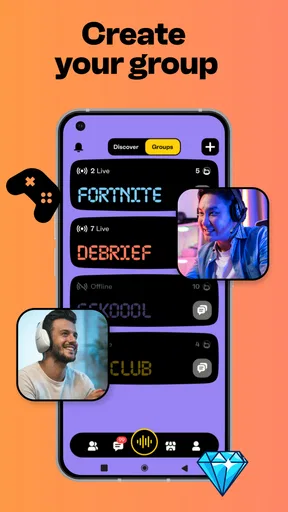
It is also not the best option for planned group communication. If I needed to coordinate a family event, manage a work team, or make sure every invited person receives the same information, I would choose a private group chat or a dedicated meeting tool. Those alternatives offer clearer membership and more dependable organization. This app is stronger when the goal is casual discovery rather than reliable coordination.
On the other hand, I would choose it over text when I wanted the feeling of dropping into a public conversation without preparing a post. A quick opinion about a game, a reaction to a movie, or a relaxed discussion about daily life can feel more natural aloud. The lack of a formal posting process is a weakness for careful discussion, but it is a strength for spontaneous interaction.
There is a useful middle ground for everyday use. Imagine waiting for a friend after work with ten minutes to spare. Instead of scrolling silently through a feed, you can listen to a live discussion, decide whether the subject interests you, and contribute a brief thought. If the conversation becomes repetitive, you leave without having invested much time. That low-commitment pattern is where the app makes the most sense to me.
I would skip it if you dislike hearing strangers, feel uncomfortable speaking spontaneously, or need a guaranteed quiet experience. I would also be cautious if your phone is older, your connection is unreliable, or your audio hardware regularly causes problems. Those conditions do not make the app unusable, but they increase the amount of friction in a product whose main value depends on immediate voice interaction.
Who will get the most from it
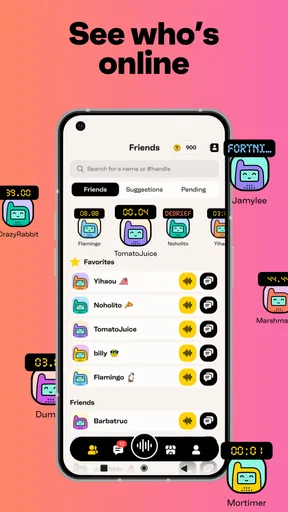
The strongest audience is someone who enjoys casual social discovery and does not need every interaction to become a lasting relationship or searchable record. Movie fans, game players, and people who like exchanging everyday opinions may find the format more engaging than another endless text feed. It is especially appealing if you enjoy listening before deciding whether to participate.
It can also work for people who want to practice speaking in a low-stakes setting, provided they are comfortable with public conversation and follow sensible privacy habits. I would start by listening, then make short contributions about subjects I already understand. That approach reduces pressure and helps reveal which frequencies have a conversational style that feels welcoming.
The app is less convincing for users who want a polished content library. There is no substitute for a podcast when you want edited audio, a video platform when you want visual demonstrations, or a private messenger when you want dependable one-to-one contact. Its value comes from the unpredictability of live voices, not from replacing every other social format.
From a practical standpoint, I would also remember that the app is free but not entirely outside the usual purchase model. I would use the free experience long enough to understand whether open voice conversations genuinely fit my routine. If I only open it occasionally and leave many sessions quickly, spending money would make little sense. The right question is not whether an optional item looks attractive, but whether the app has already become a regular part of my social habits.
My practical verdict after using the voice-first format
Walkie Talkie - All Talk App is an interesting alternative to ordinary social browsing because it asks me to participate through live audio rather than passively consume a feed. Its best moments are spontaneous, informal, and surprisingly personal without requiring a long message or a carefully prepared profile. That makes it easy to recommend to curious users who enjoy open conversations about entertainment and daily life.
My recommendation comes with clear conditions. Start by checking device compatibility, connection quality, audio routing, and microphone behavior. Give yourself time to learn the difference between an inactive frequency and a technical problem. Use headphones or a quiet room when needed, and do not share private details in public conversations. These small habits make a noticeable difference to the first impression.
The app’s 4.5 average from around sixty-three thousand ratings and its audience of over ten million installs show that the concept has broad appeal, but popularity does not remove its trade-offs. Open voice spaces can be lively one moment and uninteresting the next. They can feel more human than text, yet less controlled than a private group. That unpredictability is not a flaw to hide; it is the central bargain.
For me, the final decision is straightforward: choose it if you want casual, live social audio and are happy to explore until you find a conversation worth joining. Choose another tool if you need privacy, structure, searchable discussions, or dependable group coordination. The app is at its best when you treat it as a spontaneous place to drop in, not as a replacement for every communication tool on your phone.
Verdict
Strengths of Walkie Talkie - All Talk App
- Simple push-to-talk design is easy for beginners to understand.
- Supports quick voice communication without typing messages.
- Useful for coordinating groups during trips, events, or outdoor activities.
- Can feel more immediate than regular messaging apps.
- Lightweight concept focused on fast voice exchanges.
Limitations of Walkie Talkie - All Talk App
- Requires a stable internet connection for reliable communication.
- Background microphone access may affect battery life and privacy.
- Voice messages can be disruptive in quiet public places.
- Audio quality may vary with network strength and device hardware.
- Some features or channels may require in-app purchases or ads.
Similar Picks in This Category
View All
Meta Platforms, Inc.4.6

Instagram4.0

Likee-Live, Chat & Party Games
Likeme Pte. Ltd.4.4

Facebook Lite
Meta Platforms, Inc.4.5

TikTok - Videos, Shop & LIVE
TikTok Pte. Ltd.4.0

Moj: Free Short Drama & Reels
ShareChat4.1
Frequently Asked Questions
What is Walkie Talkie - All Talk App and how does it work?
Walkie Talkie - All Talk App is designed to let users communicate with others using a push-to-talk style interface. After opening the app, you generally select or join an available channel, press the talk button, and speak while holding it. Your message is transmitted over the internet, so the experience depends on a stable Wi-Fi or mobile data connection rather than traditional radio signals.
Does Walkie Talkie - All Talk App require an internet connection?
Yes. Unlike a real handheld walkie-talkie, the app relies on an internet connection to send and receive voice communications. Wi-Fi is usually the most reliable option, while mobile data can also work if coverage is strong. Users should keep in mind that weak connectivity may cause delays, interruptions, reduced audio quality, or difficulty joining conversations.
Can I use the app to talk privately with friends?
The privacy options depend on the channels and communication features provided by the current version of the app. Some conversations may be open to other users, while others can be limited through private rooms, invitations, codes, or contact-based communication. Before sharing personal information, check the room settings carefully and avoid assuming that every conversation is private by default.
Is Walkie Talkie - All Talk App free to download and use?
The app may be available to download without an upfront charge, but the overall experience can vary depending on advertising, optional purchases, subscriptions, or other in-app features. Users should review the store listing and the payment screen before confirming any transaction. Also remember that mobile carrier data charges may apply when using the app away from Wi-Fi.
What permissions and device features does the app need?
A walkie-talkie application normally needs access to the device microphone so it can record your voice during conversations. It may also request notifications to alert you about incoming messages or channel activity, and possibly network-related access to maintain communication. Review each permission request before accepting it, and deny anything that seems unnecessary for the features you plan to use.
